
Digital Photo Frame User Manual

4
3. About the Digital Picture Frame
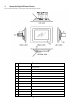
This section describes the various parts of the NuVue Picture Frame.
Items Functions
1
Power On/Off/Menu Turn the NuVue Picture Frame On and Off, or press to
display Menu
2
Enter To confirm a setting or function
3
Forward Used to navigate Forward
4
Up Used to navigate Up
5
Down Used to navigate Down
6
Back Used to navigate Back
7
CF Card Slot Slot for CF card
8
3 in 1 Card Slot Slot for SD/MMC/MS
9
DC In Receptacle Power Connection to the adaptor
10
Desktop Stand Placing the NuVue Picture Frame on a desk
11
IR Sensor Remote Control
12
AV Out To TV