
User`s manual


Dino-Lite Handheld Digital Microscope User’s Manual
19
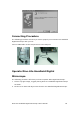
3. Adjust the focus: Use the thumb to rotate the area A as shown.
4. The magnification power will be higher if Dino-Lite Handheld Digital Microscope
is closer to the observed object.
Remark: Can also use Video Setting function of DinoCapture for image
adjustment. (Please refer to page 25)
5. When the object is located at the top of the front cap, there are two focus
positions, each with different magnification power, can be found by rotating the
focus knob.
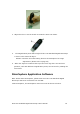
DinoCapture Application Software
Note: Before start DinoCapture, please make sure Dino-Lite Handheld Digital
Microscope has been connected to PC via USB.
Click DinoCapture, the DinoCapture main screen will be shown as below.