
Instructions


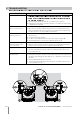
Table Of Contents

12
Robotic Pool Cleaner MCC6/MTC6 | User Instructions
8. TROUBLESHOOTING
SU V XY Z[\\YZV Z]^[V_]`Z a ] `]V Z]^bY VXY cd]f^Yg h ]`VihV j][d aYi^Yd
Problem Solution
kllm nmpqupv wlpx uly zl{p
1.
n|p}~ y|qy y|p lpv x m x mp w u quw yvupw quw y|qy y|p
}qmp x xp}vpm } luup}ypw qmm y|p q uyl y|p xwp l y|p lpv xm
2.
uxvp y|p lpv l ympy x u}yluu vlpvm quw y|qy y | qx uly y v pw
y|p vpq~pv u y|p x p l
3. Turn the power supply off. Wait 30 seconds then turn it back on
4. Unplug the power supply. Open the impeller cover and check that nothing
is trapped in the impeller
The Pool Cleaner moves but
does not clean the pool
1. Clean the filter bag/cartridge
2. After the Pool Cleaner starts moving observe it for several minutes and
make sure that it keeps moving. If it stops moving check the impeller and
the drive system to see if any debris is stuck there
The Pool Cleaner cleans
only part of the pool
1. Check that there is enough slack in the cable for the Pool Cleaner to reach
all of the pool
2. Clean the filter bag/cartridge
3. For MCC6 only: push in the float on the cable side (see figure A)
4. Check the brushes to see if they are obstructed or worn out
The Pool Cleaner floats
instead of sitting on the
floor of the pool
1. Try removing the air again
2. With the Pool Cleaner in the water squeeze the combined brush/Wonder
brush to make sure that they are completely water absorbent
Cable has kinks 1. For MCC6 only: push in the float on the non-cable side (see figure B)
2. To remove the kinks stretch the cable out completely and let it sit for at
least a day in the sun
The Pool Cleaner doesn’t
climb the walls
1. Clean the filter bag/cartridge
2. Check the level of the chemicals of the water. Improper levels may allow the
growth of algae making the walls slippery. If so, adjust the levels and scrub
the walls
3. Check that the brushed aren’t worn out
4. Check that the wall climbing mode hasn’t been cancelled via the remote
control unit (MTC6 only)
Click
Click
A B