Users Manual
Manuals
Brands
Dongguan Tunling Electronic Technology Manuals
Camera & Photo
Network surveillance camera
11
12
13
14
15
16
17
18
19
20
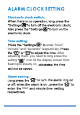
enter “hour",
"minute" and "seconds" respectively
After
adjusting them, you need to long press the
setting icon till the display screen from
flashing to steady on
hour
1
...
...
14
15
16
17
18
...
...
39