
Operation Manual
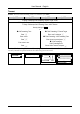
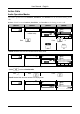
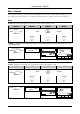
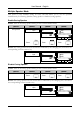
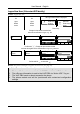
Table Of Contents
- Copyright
- Warranty
- Declaration of conformity
- Safety instructions
- Disposal of the product
- Hardware Components
- User Interfaces
- User and Administrator Mode
- Documentation
- Phone Installation
- Phone Initialization
- Registration
- Idle Screen
- Phone User Interface
- Web User Interface
- General Configuration Tasks
- Display Configuration Tasks
- Audio Configuration Tasks
- SIP Identity Configuration Tasks
- Function Key Configuration Tasks
- Maintenance Tasks
- Outgoing Calls
- Extension (SIP identity) for Outgoing Calls
- Making Calls
- Auto Completion (Number Guessing)
- Call Completion
- Call Termination
- Redial
- Call Indication
- Accepting Incoming Calls
- Call Waiting
- Denying Incoming Calls
- Denying Incoming Calls Automatically
- DND (Do Not Disturb) Mode
- Call Forwarding
- Audio Operation Modes
- Mute / Unmute
- Multiple Speaker Mode
- Hold and Resume
- Call Transfer
- Conference
- Call Recording
- Logoff All Users (Extensions/SIP Identities)
- Logon New User (Extension/SIP Identity)
- Access
- Access
- Availability
- Access
- Changing the Presence State
- Contact Presence
- Acoustical Indication
- Visual Indication
- Retrieve New Messages
- Busy Lamp Field (BLF) feature
- “Calls” List
- Call Pickup

User Manual - English
67
Timeout
Action: Activate call forwarding event “on timeout” (to extC)
ip810c ip820c ip830c ip840c
Setup Preferences Call Forwarding Timeout Target: <extC>
Setup Preferences Call Forwarding Timeout Timeout (sec): <time in sec>
Setup Preferences Call Forwarding Event: <After Timeout>
Save by clicking on Save
or
Call Forwarding Time 7 Call Forwarding 5 Timeout Target
Press Enter <extC> and press
Enter <extC>
7 Call Forwarding 2 Call Forwarding Time
Press Enter <time in sec>and press
Enter <time in sec>
7 Call Forwarding
1 Call Forwarding Event
Press Choose “After Timeout” and press
Result: Call forwarding is activated. Incoming calls are forwarded to extC when the time (in
seconds) entered has passed without the call having been answered.
ext1 time
CFwd to extC
date
CFwd to extC
time
… … … …
ext1
CFwd to extC
date
date time
ext1
CFwd to extC