
Operation Manual
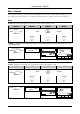
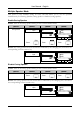
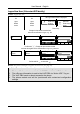
Table Of Contents
- Copyright
- Warranty
- Declaration of conformity
- Safety instructions
- Disposal of the product
- Hardware Components
- User Interfaces
- User and Administrator Mode
- Documentation
- Phone Installation
- Phone Initialization
- Registration
- Idle Screen
- Phone User Interface
- Web User Interface
- General Configuration Tasks
- Display Configuration Tasks
- Audio Configuration Tasks
- SIP Identity Configuration Tasks
- Function Key Configuration Tasks
- Maintenance Tasks
- Outgoing Calls
- Extension (SIP identity) for Outgoing Calls
- Making Calls
- Auto Completion (Number Guessing)
- Call Completion
- Call Termination
- Redial
- Call Indication
- Accepting Incoming Calls
- Call Waiting
- Denying Incoming Calls
- Denying Incoming Calls Automatically
- DND (Do Not Disturb) Mode
- Call Forwarding
- Audio Operation Modes
- Mute / Unmute
- Multiple Speaker Mode
- Hold and Resume
- Call Transfer
- Conference
- Call Recording
- Logoff All Users (Extensions/SIP Identities)
- Logon New User (Extension/SIP Identity)
- Access
- Access
- Availability
- Access
- Changing the Presence State
- Contact Presence
- Acoustical Indication
- Visual Indication
- Retrieve New Messages
- Busy Lamp Field (BLF) feature
- “Calls” List
- Call Pickup

User Manual - English
70
Multiple Speaker Mode
This option is only available during an active call and allows you to use two speakers
simultaneously for listening (handset/casing speaker or headset/casing speaker).
Enable Casing Speaker
Action: Turn on the casing speaker during an active call in handset mode.
ip810c ip820c ip830c ip840c
'extA
1:10
… … +Spkr
…
—— Connected ——
extA
1:10
… …
… +Spk
r
Connected time
e
extA
f
extB
… … … +Spkr
Not applicable
Press
+Spkr
S3
Press
+Spkr
S4
Press
+Spkr
S4
Result: The casing speaker has been activated as indicated by the changing text/icon above the
corresponding context-sensitive key
'extA
1:10
… … -Spkr
…
—— Connected ——
extA
1:10
… …
… -Spkr
Connected time
e
extA
f
extB
… … … -Spkr
Disable Casing Speaker
Action: Turn on the casing speaker during an active call in handset mode.
ip810c ip820c ip830c ip840c
Press
-Spkr
S3
Press
-Spkr
S4
Press
-Spkr
S4
Result: The casing speaker has been deactivated as indicated by the changing text/ icon above
the corresponding context-sensitive key
'extA
1:10
… … +Spkr
…
—— Connected ——
extA
1:10
… …
… +Spk
r
Connected time
e
extA
f
extB
… … … +Spkr