
User Guide User Manual
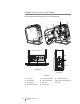
Table Of Contents
- About Your New Label Maker
- Getting to Know the Label Maker
- Getting Started
- Using Your Label Maker as a Local Printer
- Using Your Label Maker as a Network Printer
- About DYMO Label Software
- Label Maker Status
- Caring for the Label Maker
- Troubleshooting
- Documentation Feedback
- Environmental Information
- Safety Precautions for Lithium-Polymer Rechargeable Battery Pack
5
LabelManager
®
Wireless PnP
User Guide
Getting to Know the Label Maker
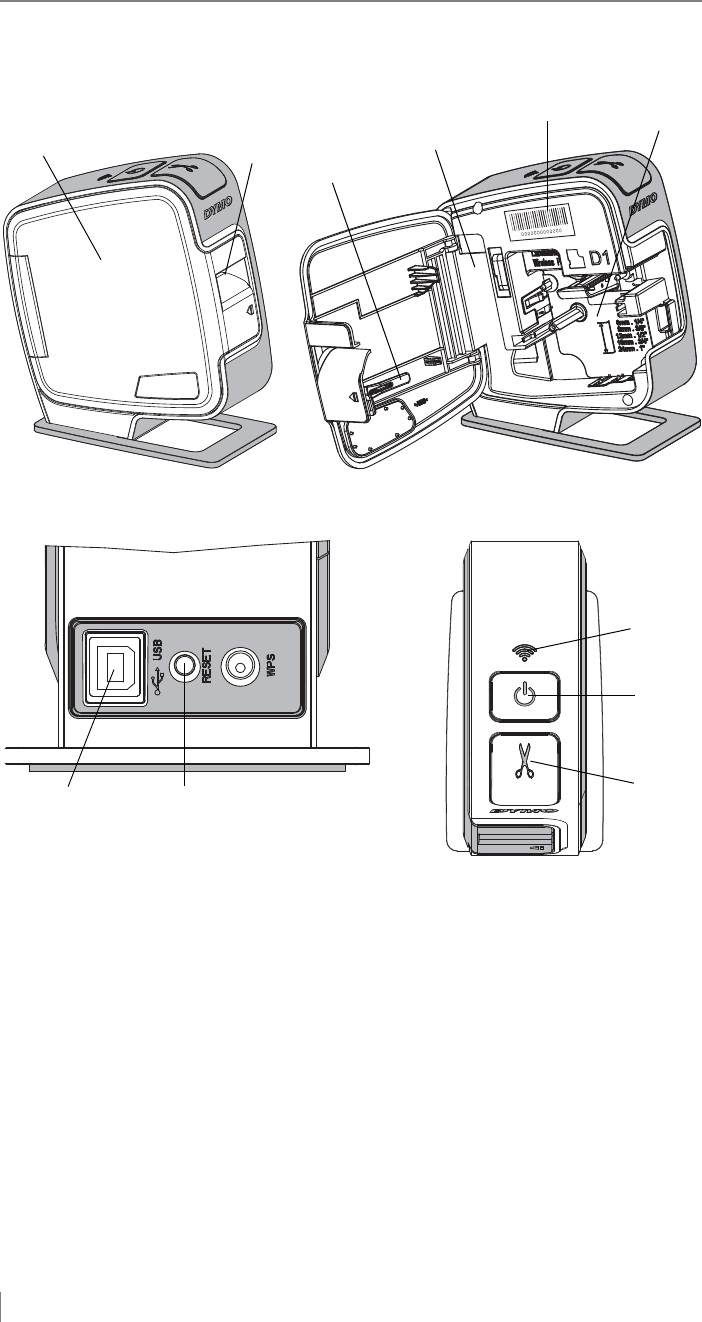
Become familiar with the features shown in the following figure.
1 Side cover 5 Serial Number label 9 Wireless status light
2 Label exit slot 6 Label compartment 10 Power button/status light
3 Cleaning tool 7 USB port 11 Cutter
4 Battery compartment 8 Reset button
4
2
3
1
5
9
11
10
7
8
6
Figure 1
Back View
Top View