
Operation Manual





<
Pulsports T-101/T-201
E-11
HEART RATE FUNCTION
DESCRIPTIONS
1.Start /Stop heart rate measure function
1. Press E.MODE 2 seconds to start heart rate measurement
function.
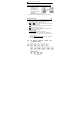
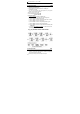
2. When the function is operating,
the LCD will display the signal
as follow:
3. Press E.MODE 2 seconds to
stop heart rate measurement
function.
4. If a signal is not received for 5 minutes, the function will turn off
automatically.
2. Start/Stop heart rate data record function
1. Press E.MODE 2 seconds to start heart rate measurement
function.
2. Press E.MODE to change to “STW” function.
3. Press ST/SP, the signal shown as ” ” at the middle of the
display will change to “
“, it means the data record function is
started. Stop by pressing ST/SP, the signal will change to “
“.
4. “AV G ”, “STW”, “CAL”, “EX.T”, “WT.L”, “FT.L” and “MAX”
functions will only work while the record function is on. (CAL,
WT.L and FT.L T-201 Only)
5. “CAL”, “WT.L“ and “FT.L” mode will be calculated when the
heart rate is equal or over 90 bpm. (CAL, WT.L and FT.L T-201
Only)
3. Reset heart rate record data
1. Press E.MODE to change to “STW” mode.
2. Press T.MODE 2 seconds to clear the record data.
4. Heart rate display descriptions
1. Intensity = (Current heart rate/Maximum heart rate) × 100%.
2. Range of heart rate measurement is from 40 bpm to 240 bpm.