
Operation Manual




<
Pulsports T-101/T-201
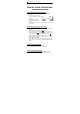
5. Newest Design: Change Display for BPM and %HR
1. When heart rate measure
function starts, you can
press T.MODE and
E.MODE simultaneous
to change display position
of “BPM” and
“%HR” Digital intensity to fit your need.
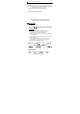
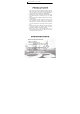
2. When the function is operating, the LCD will display: like above.
6. Target zone mode T-Z
Setup the target zone by entering the percentage of maximum
heart rate. Maximum heart rate based on the data you input.
1. Press ST/SP to change to next target zone set.
2. “ ” and “ ” will not display when the heart rate within the
target zone. (No Beep sound)
3. “ ” will display when the heart rate is below the lower limit of
the target zone. (Beep should sound).
4. “ ” will display while the heart rate is above the upper limit of
target zone. (Beep should sound).
5.Target zone setting:
a). Press E.MODE to change to “ T-Z ” mode.
b). Press SET 2 seconds to enter target zone setting mode.
c). Press T.MODE or ST/SP to select how many sets target
zone you want.
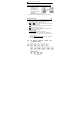
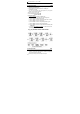
d). Refer the Data Setting Processes
to adjust the Target zone
data (Refer Fig .D).
Fig. D) Digital intensity target zone
program setting
E-12