
Manual


132
6. HowdoIresetmydevicetofactorydefaultsettings?
a. Toresetthedevicebacktoitsfactorydefaultsettings,pressandholdthe
WPS/Resetbuttonforover10seconds,untilthepowerLEDbeginstoflash.
Pleasewaitafewminutesfortheproducttorestart.Whenthedevicerestarts,
allsettingswillbereset.Defaultsettingsaredisplayedontheproductlabelon
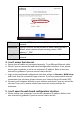
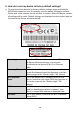
thebackofthedevice,asshownbelow:
RouterLogin EnterthisURLinawebbrowsertoruniQSetupor
configureadvancedsettings.Youmustbe
connectedtothedevicebyWi‐FiorEthernet
cable.
Username/Password Thisisthedefaultusernameandpasswordto
accessthebrowserbasedconfigurationinterface
whenyougotothe“RouterLogin”URL(above).
Wi‐FiNetwork
Name
ThisisthedefaultWi‐Finetworknameforthe
device.Searchforthisname(SSID)andconnectto
itinordertoaccessthe“RouterLogin”URL
(above).
MAC AMACaddressisuniquetoeverydeviceandis
usedforidentificationwithina network.Your
device’suniqueMACaddressisdisplayedhere.
PINCODE Thisisyourdevice’sPINcodeforWi‐FiProtected
Setup(WPS).