
- EIZO NANAO User's Manual Color LCD Monitor FlexScan L568, FlexScan L568-AS
Table Of Contents
- User’s Manual FlexScan L568/L568-AS
English
10 1. INTRODUCTION
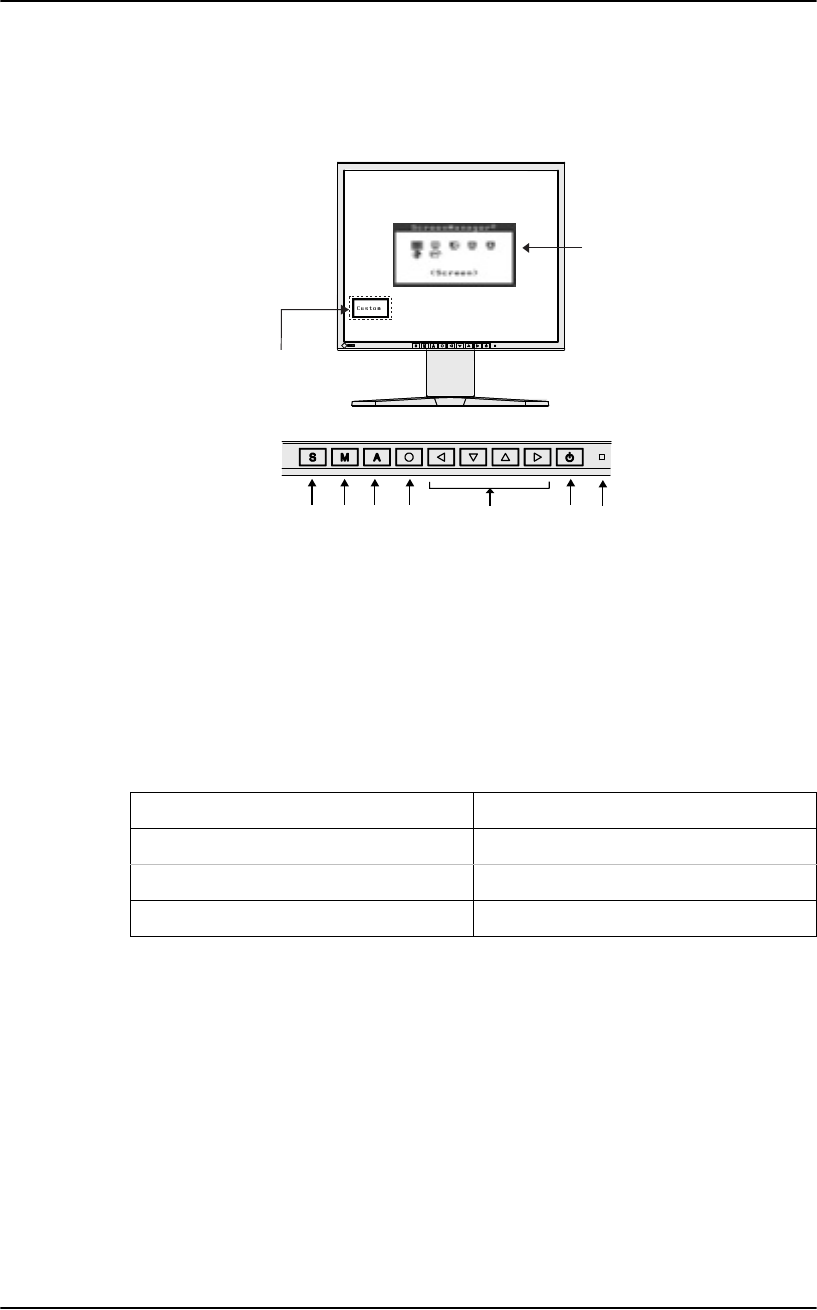
1-3. Controls & Connectors
Front (L568 is given as an example)
(1) ScreenManager
®
(2) Input Signal Selection Button
(3) Mode Button*
1
(4) Auto Adjustment Button
(5) Enter Button
(6) Control Buttons (Left, Down, Up, Right)
(7) Power Button
(8) Power Indicator*
2
*1 Directly pressing the Mode button allows you to select a FineContrast mode. (The main
menu of ScreenManager and the FineContrast menu cannot be displayed at the same time.)
*2 Regarding the power indicator for the “Off Timer”.
Blue Operation
Yel low Po we r s a v in g
Flashing yellow (2 times for each) Power save mode Digital only
Off Power off
(6)(5) (7) (8)
(1)
(3) (4)(2)
Control Panel
FineContrast Menu