
Nanao User's ManualColor LCD Monitor FlexScan L675

2. CONNECTING UP 17
ENGLISH
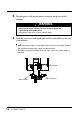
4. Plug the other end of the power cord into a power outlet.
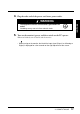
5. Turn on the monitor’s power and then switch on the PC’s power.
Whenever finished, turn off the PC and the monitor.
• When turning on the monitor, the kind of the input signal (Signal 1 or 2/Analog or
Digital) is displayed for a few seconds on the right top corner of the screen.
´ The equipment must be connected to a grounded main
outlet.
Not doing so may cause in fire or electric shock.
WARNING
WARNING