
User Guide
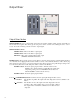
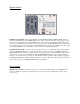


REAR PANEL
123456789101112
1. AUDIO INPUT: Main audio input into the Bi-Filter. Signals from a mixing board or a musical instrument
go here.
2. EFFECTS SEND: EFFECTS SEND is an Output jack that provides a buffered, preamplified version of the
signal present at the AUDIO INPUT jack. This signal can be used to go into an external
effects loop. The output present at this jack is after the AUDIO BOOST switch on the
front panel.
3. EFFECTS RETURN: EFFECTS RETURN is an Input jack that accepts the signal from an external effects loop.
NOTE: The EFFECTS SEND and EFFECTS RETURN jacks allow the use of audio
effects BEFORE the filter stages. It is therefore possible to put effects on the signal before
the filters but still obtain the envelope from the original signal. It is also possible to have
one instrument’s envelope modulate another instrument: connect one instrument into the
AUDIO INPUT jack for its envelope and connect another instrument into the EFFECTS
RETURN jack to go through the filters.
4. FILTER 1 OUTPUT: Audio Output from Filter 1 only. The output is before the FILTER 1 MIX slider on the
front panel, so the full Filter 1 output will always be available no matter the position of its
mixer slider. NOTE: There will be no audio output from this jack when in bypass mode
due to the TRUE BYPASS switching of the input signal.
5. FILTER 2 OUTPUT: Audio Output from Filter 2 only. The output is before the FILTER 2 MIX slider on the
front panel, so the full Filter 2 output will always be available no matter the position of its
mixer slider. NOTE: There will be no audio output from this jack when in bypass mode
due to the TRUE BYPASS switching of the input signal.
6. MAIN OUTPUT: Main audio Output for the Bi-Filter. The signal on this jack is the output of the mixer sec-
tion on the front panel. So there will be a mix of Filter 1, Filter 2 and the Dry input signal
coming out of the MAIN OUTPUT jack. When in TRUE BYPASS mode, the DIRECT
unmodified instrument signal will be output on this jack.
11