
User Guide

Drivers
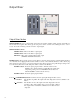
Envelope Drive
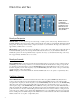
ENV DRIVE Slider: Controls the envelope follower sensitivity to the input signal. Generally set it so the red OVER
LED blinks on the loudest notes, but all settings produce interesting effects. This is not an all or nothing fader. Different
locations on the slider produce different results.
LOG/LIN Switch: Provides different dynamic response to the input signal.
• The LOG position produces consistent envelope tracking
no matter how soft or aggressive your input signal is.
• The LIN position produces an envelope that follows the
full dynamic range of the input signal.
OVER LED: Lights when the envelope follower is saturated (100%) by the input audio signal
AUDIO BOOST Switch: In the DOWN (OFF) position, the audio signal into the filters is set at unity gain. In the UP
(ON) position, the audio signal into the filters is amplified according to the setting of the ENV DRIVE slider.
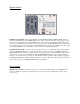
Sweep Oscillator
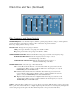
RATE Slider: Controls the Low-Frequency sweep oscillator (LFO) rate.
SHAPE Slider: Changes the LFO waveform duty cycle from 50% in the center position to 10% or 90% at the top or
bottom positions. The Shape Slider can be used to change the shape of a triangle wave to a rising sawtooth wave (in the
top position) or falling sawtooth wave (in the bottom position). When in square wave mode, the Shape Slider controls
the length of the pulse width, from short (in the top position) to long (in the bottom position).
SHAPE Switch: Switches the LFO waveform from Triangle wave in the top position, to Square wave in the bottom
position, to completely Off in the middle position.