
User Guide

Output Mixer
Output Mixer Section
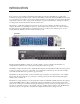
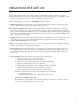
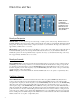
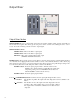
OUTPUT MIXER: Provides a 3 channel audio mixer where the signals from Filter 1, Filter 2 and the original Dry sig-
nal can all be mixed together. These sliders give the user precise control over their sound, enabling the user to “season
to taste” the amount of filtering versus the amount of original signal.
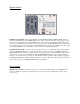
OUTPUT LEVEL Controls:
FILTER 1 Slider: Mixes in the Filter 1 output signal.
FILTER 2 Slider: Mixes in the Filter 2 output signal.
DRY Slider: Mixes in the original un-filtered audio signal
(AFTER the AUDIO BOOST switch).
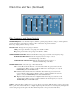
INVERT Switches: These switches give the user the ability to invert the signal going into each filter. When listening to
one of the filters alone, flipping the Invert switch will have no affect on the sound. If both filters as well as the Dry sig-
nal are all mixed together and one or both of the filters have their Invert switch on (along with the right settings for the
rest of the sliders), then the user will obtain phase shifter sounds from the Bi-Filter.
INVERT 1 Switch: Inverts the signal going into Filter 1. When the switch is in the
DOWN position, the Invert function is OFF. When the switch in the
UP position, pointing to the word INVERT, the Invert function is
ON. The INVERT 2 switch works the same way.
INVERT 2 Switch: Inverts the signal going into Filter 2.
1 + 2 / 1 2 (FILTER PATH) Switch: Determines the audio signal path through the filter sections.
1 + 2 Position: Puts the filters in parallel. The signal at the Audio Input jack is fed into both Filter 1 and
Filter 2.
1 2 Position: Puts the filters in series. The signal at the Audio Input jack is first fed
into Filter 1. The output of Filter 1 then goes into the input of Filter 2.
The output of Filter 1 will still be available at its mix slider and at its
output jack.
9