
User's Manual

CHAPTER 8
ANTENNA SETUPS
Revised: 2 Jul 08 8-5 EST P/N AA107G
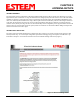
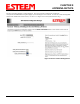
Press the next button and Figure 2 will be displayed. The receive antenna is configured by selecting the
wlan0_dot11CurrentRXAntenna drop down (Figure 2) and selecting the receive antenna. A value of 0 = Dual diversity (Both
antenna Ports A & B will be used to receive). A value of 1 = Single receive source (Antenna Port A only).
Figure 2: Receive Antenna Settings Menu