
Technical data




42
CIB -
CIB +
POWER SUPPLY
DISPLAY
POWER SUPPLY
CONNECTION
DIMENSIONS AND WEIGHT
OPERATING CONDITIONS
TECHNICAL PARAMETERS
Type:
Aspect ratio:
Visible area:
Backlight:
Touchpad:
Display:
Number of points:
Color Depth:
Supply voltage / rated current:
Connection:
Connecting conductors profi le:
Operating temperature:
Storing temperature:
Protection degree:
Overvoltage category:
Pollution degree:
Operating position:
Installation:
Dimensions
Weight:*:
colored TFT LCD
3:4
52.5 x 70 mm
active
4-wire resistive
3.5”
240 x 320
16.7M (24 bit color)
27V DC/ 150 mA
terminals
max. 2.5mm
2
/1.5mm
2
with sleeve
0 to +55°C
- 20 to +70°C
IP20
II.
2
any
installation box
94 x 94 x 30 mm
EST3 (127 g)
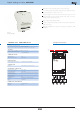
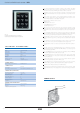
Control unit with touch screen EST3
* Weight is listed with plastic frame
EAN code
EST3
(white frame, white intermediate frame, white back cover) - 8595188177009
EST3 (black frame, dark gray intermediate frame, dark gray back cover) - 8595188177016
The control unit with touch screen EST3 is a suitable control element of the iNELS
system in places where it is necessary to control multiple devices. The unit replaces
several drivers and enables minimizing the number of switches on the wall.
EST3 features a 3.5 "color touchscreen with an aspect ratio of 3:4. The basic display
resolution is 240 x 320 pixels. The color depth of 16.7 million colors (24 bit color, True
Color).
Use the touch sensing surface to control confi gured buttons and symbols on the
screen just by a light touch of a fi nger. Individual symbols on the screen are in the
"Press" animated by the associated output in the system.
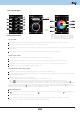
EST3 can have a combination of these screens:
- Buttons screen
- Temperature control screen
- Control RGB light sources screen
- Security keyboard screen
Buttons screen can be set in the menu and can be optionally confi gured according
to user requirements . There are four basic templates of buttons matrix - 2x2, 2x3, 3x3
and 3x4 . The screen can then have up to 12 buttons to control up to 12 appliances or
scenes.
In the confi guration buttons menu, it is possible to assign a symbol (icon) of the preset
menu to individual keys from the selected templat (48 diff erent symbols - bulb, blinds,
party scene, etc.), possibly write to the button three alphanumeric characters.
The temperature control screen enables correction of the temperature of the selected
heating circuit in the range of ± 5 ° C, or entering of the desired temperature in absolute
value.
The virtual wheel can be used for temperature correction, where you can drag your
fi nger across the screen to control the temperature by half a degree Celsius.
The temperature correction can also be used instead of the virtual wheel symbols "+
" and "- " .
EST3 units do not have an integrated temperature sensor, or terminals for connection
to an external temperature sensor. Within the IDM software, it is possible to assign any
unit of heat input system iNELS.
The control RGB light sources screen allows you to comfortably control your RGB light
sources and adjust the luminous atmosphere as needed.
For these RGB light sources , it is possible to use the controls on the screen to adjust
the color and brightness. It is also possible to directly set the RGB illumination light
source into white color.
Located in the left upper corner of the screen are 4 indicators that can signal the
status of any logical input / output in the iNELS system.
In the settings menu, you can defi ne the language menu, screen saver, sleep mode,
brightness settings, select the default display and devices display mode of EST3
Unit EST3 is on the CIB represented by one hardware address.
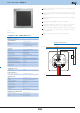
EST3 are designed as LOGUS90 devices (EST3 however cannot be placed into multi-
frames with other devices in this design) and are intended for mounting to installation
box.