
User manual





A7+InternetTablet–UserManualv1.5 Page10
Chapter 4 – Basic Settings
4.1 Display Options
4.2 Volume & Sound
4.3 Customizing the Desktop
4.4 Date & Time
4.5 Language
4.6 Location & Security
4.7 Accounts & Sync
4.1 Display Options
The A7+ offers easy flexibility in setting the screen brightness level,
animation options and screen timeout settings.
Setting the Brightness Level
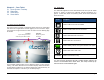
There are two ways to set the brightness level of your Tablet:
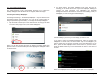
1. Slide the Status Bar down from the top of the screen to reveal the
brightness slider bar. Adjust it to the desired level or tap the check
box to turn on/off the auto-brightness function.
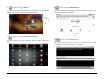
2. Launch Settings>Display>Brightness and adjust the slider bar.
Changing the Screen Timeout Setting
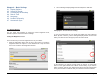
To set your preferences for how quickly the Tablet goes into Suspense
Mode (Screen Timeout), launch Settings>Display>Screen timeout and
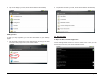
make your selection from the popup menu as shown below.
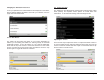
In this submenu you will see a wide variety of choices. A green radio
button on the right indicates the Tablet’s current setting. If you want to
make a change, just tap your selection and the screen will change back
to the previous menu to indicate that your selection has been selected.