
User manual





A7+InternetTablet–UserManualv1.5 Page11
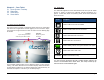
Changing the Animation Preferences
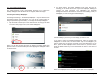
To set your preferences for what animations are displayed on the Tablet,
launch Settings>Display>Animation and make your selection from the
popup menu as shown below.
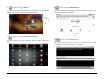
Screen Auto-Rotate
The Tablet can auto-rotate the image on your screen depending on
whether you are holding the Tablet in a vertical (portrait) or horizontal
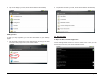
(landscape) position. To turn the feature on or off, slide the Status Bar
down from the top of the screen to reveal the check box for Auto-rotate
screen. If the box has a green check mark, the feature is turned on. Tap
the box again to toggle the feature off if desired.
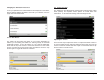
4.2 Volume & Sound
The Tablet has user-defined audio settings that include ringtones, silent
mode (vibrate), and separate volume options for media, alarm and
notifications. To access these settings, launch Settings>Sound.
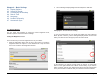
Adjusting the Volume
There are two ways to adjust the volume. To adjust the master volume or
to mute the Tablet entirely, slide the Status Bar down from the top of the
screen to reveal the volume slider bar. Adjust it to the desired level or tap
the check box to mute all sound.