
User manual





A7+InternetTablet–UserManualv1.5 Page13
4.3 Customizing the Desktop
The Tablet desktop is fully customizable, allowing you to select the
desktop wallpaper and add shortcuts for widgets, folders and apps.
Selecting the Desktop Wallpaper
The background image – the Desktop Wallpaper – may be selected from
pre-loaded images and animations or it may be an original photo or
image imported through the Gallery. To change the desktop wallpaper:
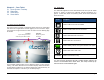
1. Tap and hold a blank spot on the Home Screen to bring up the Add
to Home screen popup menu, then select Wallpapers.
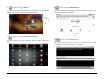
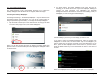
Note: You can also access this menu by tapping the Menu Smart Key
(bottom button on the black bezel) and then tapping the Wallpaper button
as shown below.
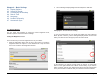
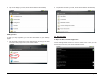
2. As shown below, the Select wallpaper from menu will pop up,
allowing you to choose the source of your new wallpaper: Gallery (for
images you have imported), Live wallpapers (for animated
background that are attractive but consume more battery power) or
Wallpaper (for non-moving pre-loaded images).
Choose Gallery if you have your own image you want to use.
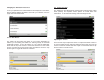
If you want to select an animated background, there are several Live
wallpapers to choose from, as shown below. Tap on the wallpaper you
want to select and you will see a preview of the new background. If you
like it, press the Set wallpaper button at the bottom. If you don’t’ like it,
press the Back Smart Key on the black bezel to return to the menu of
choices.
Note: Live wallpapers use more battery power than static wallpapers.