
User manual





A7+InternetTablet–UserManualv1.5 Page17
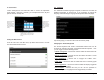
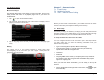
To Set the Date
Launch Settings>Time and date>Set date to access the adjustable
popup window. Using the +/- buttons, you can adjust the month, day and
year as desired, then tap Set.
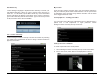
Setting the Date Format
From the main Time and date menu, tap Select date format to choose
from three different date formats.
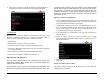
4.5 Language
The Tablet has a default language of English, but there are more than 20
additional languages to choose from. If you would like to change the
language, launch Settings>Language and keyboard>Select language.
Tap the language you want and all menus will instantly adapt.
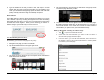
Changing the Android Keyboard
The Android keyboard has certain customizable features that can be
accessed at Settings>Language & Keyboard>Android keyboard. Here
you can toggle on/of the following 6 items:
• Vibrate on keypress – Choose this and the Tablet will vibrate when the
keyboard is pressed.
• Sound on keypress – Choose this and the Tablet will make a sound
when the keyboard is pressed.
• Auto-capitalization – Choose this to engage the Tablet’s Auto-
capitalization function.
• Quick fixes – Choose this and the Tablet will correct commonly-typed
mistakes.
• Show suggestions – Choose this and the Tablet will display suggested
words while you are typing.
• Auto-Complete – Choose this and you can use the spacebar to
automatically insert a highlighted word suggested by the Tablet.
Displaysthemonth.
Usethe+/‐to
changethemonth,
ortaptoopenthe
built‐inkeyboard
tokeyinthemonth
directly.
Displaystheyear.
Usethe+/‐to
changetheyear,
ortaptoopenthe
built‐inkeyboard
tokeyintheyear
directly.
Displaysthedate.Usethe+/‐to
changethedate,ortaptoopenthe
built‐inkeyboardtokeyinthedate
directly.