
User manual





A7+InternetTablet–UserManualv1.5 Page18
User Dictionary
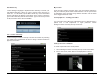
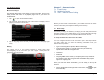
Launch Settings>Language & Keyboard>User dictionary to access your
user-defined dictionary. When you open it the first time, there are no
words in it. To add words, tap the Menu Smart Key on the black bezel
and an Add button will appear at the bottom of the screen. Tap Add to
get in Add to dictionary field as shown below. Type in the word you want
to add, then select OK to save the addition.
4.6 Location & Security
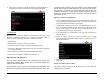
Launch Settings>Location & security to access the choices for protecting
your Tablet from unauthorized use and for using a wireless network to
pinpoint your location.
My Location
From the main Location & security menu, tap Use wireless networks to
find your location by Wi-Fi and/or mobile networks or to see your location
in applications (such as Maps) using wireless networks. Use the check
box to toggle this feature on/off.
Security Options – Locking your Tablet
You can protect your Tablet from unauthorized use in 3 different ways: a
pattern lock, a PIN requirement or logon password. Launch
Settings>Location & security>Set up screen lock.
Setting a Screen Lock Pattern
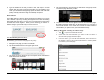
To create a personal screen unlock pattern:
1. Launch Settings>Location & security>Set up screen lock>Pattern.
2. On the next screen, watch while an example pattern is drawn.