
User manual





A7+InternetTablet–UserManualv1.5 Page26
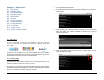
2. Enter your email address and password in the data fields, then press
the Manual setup button at the lower left.
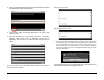
3. Choose POP3, IMAP or Exchange depending on the type of mail
server you have.
4. Enter the information for your incoming mail server – username,
password, server name, port # (if applicable), security type (if
applicable), and how often you want the mail removed from the
server.
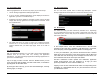
Note that the Security type and Mail deletion selections are pull-down
menus with specific choices:
Security pull-down menu:
Mail deletion pull-down menu:
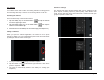
5. When all the fields have been filled in correctly, tap the Next button
at the bottom right. The Tablet will automatically test a connection to
the Incoming Mail server and Check incoming server settings. If you
have entered any wrong information, or if the Tablet is unable to
reach the mail server, an error message will appear and you will be
asked to Edit details:
If the settings check is good, you will be taken to the next setup screen to
enter information about your Outgoing mail server.