
User guide


Table Of Contents
- Using Your eMachines Flat-Panel Monitor
- Unpacking the monitor
- Connecting the monitor
- Starting the monitor
- Adjusting monitor settings
- Power management
- Maintaining
- Troubleshooting
- No power
- No picture
- Display colors are wrong
- Picture has shadows or “ghosts”
- Color is not uniform
- Image is not sized or centered correctly
- The image remains after switching off the monitor
- The image is unstable
- The message “No Input Signal” appears on the screen
- The monitor has pixels that are always dark or too bright
- Specifications
- Safety, Regulatory, and Legal Notices
Using Your eMachines Flat-Panel Monitor
2
Unpacking the monitor
Your monitor box should contain the following items:
• Monitor (with neck attached)
• Base
• This User Guide
• VGA cable
• Audio cable
• Power cord
If you are missing any items, call Customer Care. For telephone numbers, see the label on the back
of your monitor.
Connecting the monitor
To set up the monitor, first attach the base, then make your cable connections.
Attaching the base
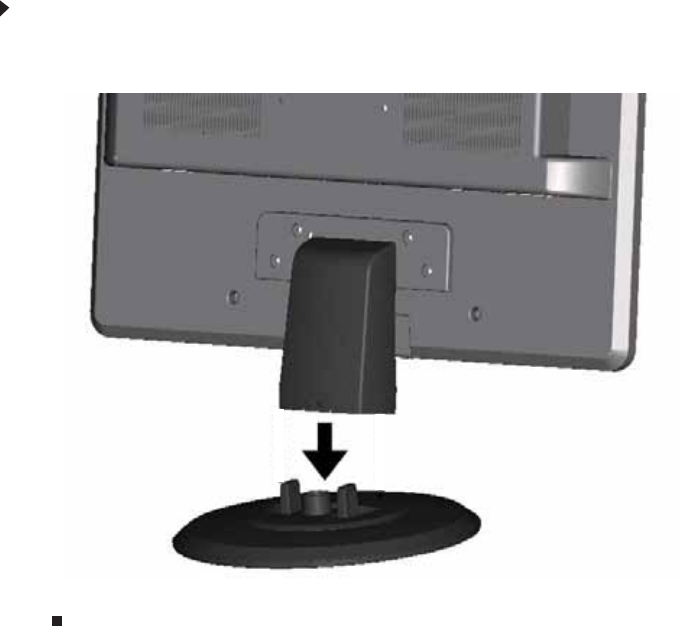
To attach the base:
• Place the monitor base on a table top, then slide the monitor neck down onto the base until
it clicks into place.