
Installation Guide



www.sureheat.com
200252-01A10
INSTALLATION
Metal Cap
Metal Cap
DO NOT REMOVE
Yellow Natural Gas
Plunger
Install Gas Fitting
Here
FOR NATURAL GAS (NG)
INSTALLATION: YELLOW
1. Remove the blue dust cover from the
regulator.
2. Remove the metal cap installed over the
NG regulator inlet.
3. Install metal cap over LP/Propane regulator
inlet. This will keep debris out of regulator.
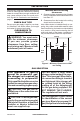
Figure 5 - Supplied Fitting
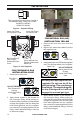
Yellow Natural Gas
Plunger Underneath
Metal Cap
Blue Propane/LP
Gas Plunger
Underneath Dust
Cover
Figure 6 - Gas Regulator
Insert Gas Fitting
for Natural Gas
Insert Gas Fitting
for Propane/LP Gas
Fitting supplied with the product located in
the hardware bag. Fitting part number:
160960-02 (straight)
160960-03 (elbow)
Blue Dust
Cover
DO NOT REMOVE
Blue Propane/LP
Plunger
Install Gas Fitting
Here
FOR PROPANE/LP GAS
INSTALLATION: BLUE
1. Remove blue dust cover.
2. Apply thread sealant to the threads on
the connection tting. While pushing in,
rotate the tting clockwise until the threads
engage the regulator. After the tting has
been hand tightened into the regulator
use a wrench to complete tightening of the
tting. Install additional tting to connect
to the house supply.
Use only the cap supplied on the
regulator. Do not use an off the
shelf pipe plug. This can damage
the plunger. The supplied regula-
tor cap is designed so it will not
engage the unused gas type.
4. Apply thread sealant to the threads on
the connection tting. While pushing in,
rotate the tting clockwise until the threads
engage the regulator. After the tting has
been hand tightened into the regulator
use a wrench to complete tightening of the
tting. Install additional tting to connect
to the house supply.