
User guide



Operation and Display Panel
Liebert
®
GXT4
™
16
3.0 OPERATION AND DISPLAY PANEL
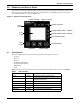
This chapter describes the Liebert GXT4 controls, particularly the operation and display panel on the
front of the Liebert GXT4. The panel has four control buttons, seven LED indicators and a liquid
crystal display (LCD), as shown in Figure 14.
Figure 14 Operation and display panel
3.1 LED Indicators
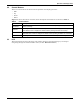
The seven LED indicators on the front of the operation and display panel are:
• Inverter
•Battery
•Bypass
• Programmable Outlet1
• Programmable Outlet2
• ECO Mode
•Fault
Figure 14 shows the indicators’ locations; their descriptions and functions are shown in Table 3.
Table 3 LED indicators
LED Indicators
LED Color
Description
Inverter Green On when the inverter is supplying power
Bypass Amber
On when the load is supplied by the mains through
automatic/manual bypass
Battery Amber On when the load is supplied by the battery
Fault Red On when an error has occurred within the UPS
Programmable Outlet1 Green On when programmable Outlet1 is On
Programmable Outlet2 Green On when programmable Outlet2 is On
ECO Mode Green On when the UPS is in ECO Mode
ESC
Button
UP Button
Programmable Outlet 1 Indicator
Bypass Indicator
DOWN Button
ECO Mode Indicator
LCD
Panel
Programmable Outlet 2 Indicator
Battery Indicator
Fault
Indicator
Inverter Indicator
ENTER Button