
User guide



Operation and Display Panel
19 Liebert
®
GXT4
™
3.4.1 Startup Screen
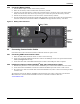
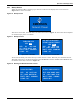
When the Liebert GXT4 is starting up, it initiates a self-test and displays the screen shown in
Figure 16 for about 10 seconds.
Figure 16 Startup screen
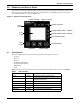
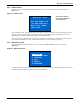
After about 10 seconds, the LCD shows one of the On screens in Figure 17; the screen shown depends
on whether input power is available.
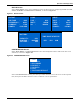
Figure 17 Startup screens
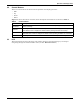
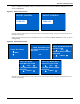
To turn On the UPS, press either the Up or Down button to select YES and press the Enter button.
The UPS will start up, the LCD will display UPS STARTING and then START SUCCESSFUL after
the UPS is turned On, as shown in Figure 18.
Figure 18 Starting and Start Successful screens
EMERSON
Network Power
O/P: 0V HZ 0.0A
I/P : 120 V 60HZ 0.0A
BATT: 100 % 320 MINS
LOAD: 0%
TURN ON UPS
YES NO
O/P: 0V 0HZ 0.0A
I/P : 120V 60HZ 0.0A
BATT: 100% 320MINS
LOAD: 0%
AC NOT AVAILABLE
START ON BATTERY?
YES NO
Input Power is Available
Input Power is not Available
O/P: 0V 0HZ 0.0A
I/P : 120V 60HZ 0.0A
BATT: 100% 320MINS
LOAD: 0%
UPS STARTING
O/P: 120V 60HZ 4.6A
I/P : 120V 60HZ 5.0A
BATT: 100% 15MINS
LOAD: 40%
START SUCCESSFUL