
User guide



Operation and Display Panel
Liebert
®
GXT4
™
24
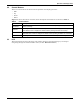
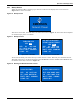
Select 1 OUTLET CONTROL and press the Enter button to enter the OUTLET CONTROL screen, as
shown in Figure 27.
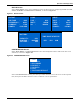
Figure 27 Outlet Control screen
Press the Up or Down button to move the cursor to the required item, and press the Enter button to
confirm the settings.
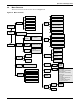
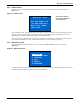
Select 2 Outlet Setting and press the Enter button to enter the OUTLET SETTING screen, as shown
in Figure 28.
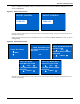
Figure 28 Outlet Setting screen
Press the Up or Down button to move the cursor to the required item, and press the Enter button to
confirm the settings.
OUTLET CONTROL
TURN OFF
REBOOT
Outlet Control is On Outlet Control is Off
OUTLET CONTROL
TURN ON
TURN OFF WHEN UPS
ON OVERLOAD AND ON
BATTERY
NO
TURN OFF WHEN UPS ON
BATTERY FOR
OFF
TURN ON WHEN POWER
RETURNS:
0 MINS
TURN OFF WHEN
RUNTIME LESS THAN
OFF
TURN ON WHEN POWER
RETURNS:
0 MINS
TURN OFF WHEN BATT
CAPACITY LESS THAN
OFF
TURN ON WHEN POWER
RETURNS:
0 MINS
TURN ON DELAY
0 MINS