
User manual
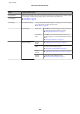
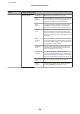
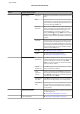
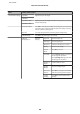

Menu Settings and Description
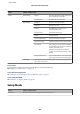
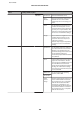
PS3 Menu Error Sheet
Select On to print an error sheet when
an error occurs in PS3 mode or when
the PDF file you tried to print is not
supported.
Coloration Select the coloration.
Image
Protect
Select On if you do not want to reduce
the print quality. When this is on,
printing stops if there is insufficient
memory.
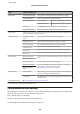
Binary
Select On for binary data and Off for
ASCII data. Binary is only available over
a network connection.To use binary
data, make sure your application
supports Binary data and that SEND
CTRL-D Before Each Job and SEND
CTRL-D After Each Job are set to No.
Text
Detection
Select On to convert text files to
PostScript files when printing. This
setting is only available when the
Printing Language is set to PS3.
PDF Page
Size
Set the paper size when printing a PDF
file from a computer or another device
without the printer driver. When Auto
is selected, the paper size is determined
based on the size of the first page that is
printed.
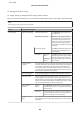
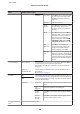
Security Settings
*2
Access Control
Select whether to set access control on the printer. When this is On en-
tering password is necessary when using the printer.
Also, set when this is On, also set whether to permit jobs without Au-
thentication.
Delete All
Confidential Jobs
Select to delete all confidential jobs stored in the Confidential Job of
Status Menu.
& “Status Menu” on page 22
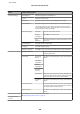
Eco Mode On You can adjust the time before power management is applied. Any in-
crease will affect the product’s energy efficiency. Please consider the en-
vironment before making any change. Select On to enable all of the fol-
lowing Eco Mode functions.
Off
Configure Sleep Timer Specify the length of the time until the LCD panel turns
black.
LCD
Brightness
Adjusts the brightness of the LCD panel.
2-Sided
(Copy)
Select On to make double-sided copying the default
setting.
2-Sided
(Memory
Device)
Select On to make double-sided printing the default
settings in Memory Device mode.
Clear Internal Memory
Data
*1
Clears the selected memory data.
User’s Guide
Menu List of Control Panel
110