
Specifications

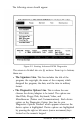

The following screen should appear:
Figure E-l. Starting Advanced ROM Diagnostics
The screen is divided into six (6) sections. From top to bottom,
these are:
l
The Signature Line.
This line includes the title of the
program, the copyright, the name of the company which
designed the program, the date, and the time in military
format.
l
The Diagnostics Options Line.
This is where the user
chooses the device/adapter to be tested. The options are:
Hard Disk, Floppy Disk, Keyboard, Video, and
Miscellaneous (Printer and Communications). Each device
option on the Diagnostics Option Line has its own
Diagnostics Options Window which appears whenever the
device option is highlighted. Device options are highlighted
by pressing the right or left arrow (cursor movement) keys
located on the numeric keypad.
Advanced ROM Diagnostics
E-3