
Specifications
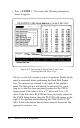
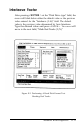
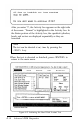

After you enter ‘Y’, the Activity box appears on the right side
of the screen. “Format” is highlighted in the Activity box. In
the Status portion of the Activity box, the specified cylinders,
heads, and sectors are displayed sequentially as they are
formatted.
Note
The test can
be aborted
at an): time
by pressing the
<ESC> key.
When the test is aborted or finished, press <ENTER> to
return to the main menu.
Figure E-5. Initiating the Hard Disk Format Test
E-16
Advanced ROM Diagnostics