
User`s guide






QUICK REFERENCE GUIDE
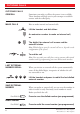
ANSWER CALLS
Answer:
Answer on another extension:
(Call ringing extension)
MAKE CALLS
Normal calls: (Extension no.)
or
(External no.)
Common abbreviated number: (Abbreviated no.)
Dial by name: Ericsson
Individual abbreviated number: (Abbreviated no. 0-9)
Last external number redial:
YOU GET BUSY TONE OR NO ANSWER
Automatic call-back:
(Lift handset when called back)
Camp on: (Keep handset off hook)
Intrusion:
DURING CALLS
Monitoring:
Individual hold: Line (Flashing key to retake)
INQUIRY
Ongoing conversation: Inquiry
(Call 3rd party)
Back to first party: Line
REFER BACK
Press flashing key to connect: Line or
Inquiry
CONFERENCE
Ongoing conversation: Inquiry
(Call 3rd party)
Message/Conference
TRANSFER
Transfer a call: Inquiry
(Call 3rd party)
(Before or after answer)
MESSAGES
”Call me”: Message/
Conference
Voice: Message/
Conference
Speak
Play-back:
Re-record: Speak
Send:
Receive messages: Message/Conference
CALL FORWARDING
Fixed diversion:
Individual internal diversion:
(New no.)
Cancel internal diversion:
Follow me, re-direct from
answering extension:
(Own no.)
(New no.)
Cancel from answ. extension:
(Own no.)
Bypass call forwarding:
(Extension no.)
INFORMATION
Enter information (pre-text):
(Select ”info code” from list below)
(Enter ”completing info”)
Erase information:
Time of return
Date of return
Lunch
Meeting
Vacation
Illness
hour (00-23) minute (00-59)
month (01-12) day (01-31)
back at, hour minute
back at, hour minute
back, month day
back, month day
1.
2.
3.
4.
5.
6.
info code completing info
BusinessPhone 250 - Basic Telephone
BusinessPhone 50 - Basic Telephone
BusinessPhone 250 - Basic Telephone
BusinessPhone 50 - Basic Telephone
DESIGNATION CARD MANAGER CD-ROM
CD-ROM On the CD you will find helpful products and your user´s
guide in electronical format.
Hardware requirements:
CPU Pentium 166MHz, 32 MB RAM
15 MB free memory on hard disk (optional)
VGA 800*600, 8 bit, 256 colors
Sound card (recommended)
CD-ROM drive (12x)
Software requirements:
Operating system: MS Windows 9x, MS Windows 2000 or
MS Windows NT 4 (service pack 3 or higher)
No CD-ROM?
Please send an e-mail to:
businessphone.documentation@sea.ericsson.se
and we will send you a personal copy for free!
Designation Card
Manager The Designation Card Manager is the tool for design-
ing and printing your personal designation cards.
Also included All user documentation as pdf-files, a quick reference
help system, a screen saver and a demo version of our
BusinessPhone Computer Based Training tool.
DBC210En_P4A_TF.qxd 00-05-11 14.37 Sida 2 (1,1)