
User guide



Voice Mail
To handle the mailbox Recorded information on the line informs about the number
of new and stored messages. If you have too many messages
stored, you will first be asked to delete saved messages.
Recorded instructions ask you to press different digits in
order to listen to caller's messages, record your own gree-
tings, change your password or exit your mailbox, etc.
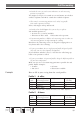
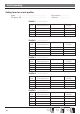
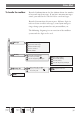
The following diagram gives an overview of the mailbox
system and the digits to be used.
35
Dialog
3212
Dialog
3210
Dialog
3211
Messages
Greeting
Security code
EXIT
Start level
Listen to the next message
Repeat the heard message
Delete the heard message
Return to start level
Exit the mailbox
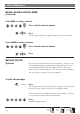
Listen to the current greeting
Record a new, end with
Leave the old greeting unchanged
Enter a new code,1-6 digits
No security code
Only digits are allowed, no star ( )!
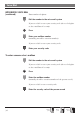
Repeat the new code
Listen to the recording
Re-record the greeting
Store the greeting
Leave the old greeting unchanged