
User guide




Programming/Adjustments
67
Dialog
3212
Dialog
3210
Dialog
3211
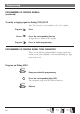
Program on Dialog 3211/3212
Program
Press
The current tone character is displayed (3212 telephone only).
Press the corresponding digit (0-9)
The telephone rings with the chosen character.
Program
Press to finish programming
Press to clear the display during programming
Note: 3212 telephone only.
HANDSET AND LOUDSPEAKER VOLUME
Use the volume keys to change the volume of the handset or
loudspeaker during a call. Adjust handset listening volume in
handset mode. Adjust loudspeaker volume when the loud-
speaker key is activated, e.g. when the key lamp is lit.
Press to change the volume
RINGING SIGNAL VOLUME
Use the volume keys to adjust the ringing signal volume
when the telephone is idle or ringing. Adjusted volume is
stored.
Press to change the volume