
Installation manual






ESI Communications Servers Hardware Installation Manual Phones
B.4
Expansion Consoles
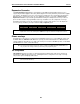
The 60-Key Expansion Console gives a designated user 60 additional programmable feature keys. It is
supported by the ESI 60 (digital or IP models), ESI 40 (digital or IP models), and 48-Key Feature Phone (digital
or IP models). The Expansion Console is connected to its host ESI phone via a special cable (provided) and
doesn’t require a separate station port of its own. Additionally, it may be connected to a 60-Key Second
Expansion Console via a special cable (provided with the 60-Key Second Expansion Console) so that one
phone can have a total of 120 programmable feature keys in addition to its own complement of such keys.
Each ESI Communications Server has a maximum number of stations that can have one or two Expansion
Consoles (60-Key and 60-Key Second) installed in a fully configured system:
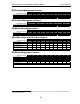
Maximum Expansion Consoles
ESI-1000 ESI-600 ESI-200 ESI-100 ESI-50
128 80 32 8 8
Note: Regardless of ESI Communications Server model, a Base Cabinet can support a maximum of eight
Expansion Consoles, and each Expansion Cabinet can support a maximum of 24 Expansion Consoles.
Phone overlays
Each ESI phone comes with one overlay for the programmable feature keys. To order additional overlays, visit
the DESI
™
Web site, www.desi.com. While there, you may also want to download the free Windows-based
software, DESI Lite, which allows you to print on the overlays. For assistance with DESI products, contact DESI
(the DESI Web site contains contact information).
Tip: Remember that ESI System Programmer software, available from www.esi-estech.com/Resellers, also
lets you print on the overlays as well as perform many other programming tasks.
VIP Softphone
VIP Softphone integrates the features of VIP Professional and an ESI desktop IP phone into a PC-based,
full-audio phone. With the appropriate license, VIP Softphone can be configured for use locally or remotely.
This product requires a third-party USB headset.
Note: For details, see the VIP Product Overview (ESI document #0450-0608) and the VIP Setup and User’s Guide
(ESI document # 0450-0513).