
User`s guide


User’s Guide Introduction
A.6
Connecting your ESI phone
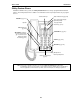
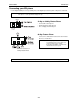
Use the diagram (below) to connect your ESI phone. The diagram represents the panel on the phone’s underside.
Note: The “Top of phone” and “Bottom of phone” references in this diagram shows the correct vertical orientation
of the phone — i.e., the part with the display is the top.
12-Key or 24-Key Feature Phone
• Connects like a basic phone.
• Handset plugs into right-side jack.
• Line cord plugs into left-side jack.
Connectors on bottom of
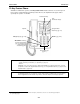
48-Key Feature Phone
48-Key Feature Phone
Connects in a similar fashion to that of the other Feature
Phones, as noted above.
Note: The 48-Key Digital Feature Phone can accept
an optional Expansion Console when used
on most other ESI systems, but this
functionality is unavailable on an ESI C-Plus
or ESI C-Plus Executive system.
Note: Use the wall mount hook (located under the handset) when the phone is in the furthest upright position.
Line cord
to wall
Handset