
Installation User guide

PPS 35 • Installation Guide (Continued)
Extron USA Headquarters
+1.800.633.9876 (Inside USA/Canada Only)
Extron USA - West Extron USA - East
+1.714.491.1500 +1.919.850.1000
+1.714.491.1517 FAX +1.919.850.1001 FAX
Extron Europe
+800.3987.6673 (Inside Europe Only)
+31.33.453.4040
+31.33.453.4050 FAX
Extron India
1800.3070.3777 (Inside India Only)
+91.80.3055.3777
+91.80.3055.3737 FAX
Extron Japan
+81.3.3511.7655
+81.3.3511.7656 FAX
Extron China
+86.21.3760.1568
+86.21.3760.1566 FAX
Extron Asia
+65.6383.4400
+65.6383.4664 FAX
Extron Middle East
+971.4.299.1800
+971.4.299.1880 FAX
Extron Korea
+82.2.3444.1571
+82.2.3444.1575 FAX
© 2013 Extron Electronics — All rights reserved. All trademarks mentioned are the property of their respective owners. www.extron.com
L
R
DO NO
T
GROUND
OR SHORT
SPEAKER
OUTPUTS
4/8
Ω
3A M
AX
POWER
12V
H
DMI
1/2
SIG
LI
NK
SIG
L
INK
3/4
INPUTS
OUTPUT
AUDIO OUT
PVS 405SA IP
AM
PLIFIED AUDIO OUT
PAGING
SENSOR
PVT IN
PVT IN
L
R
AUX
OVER PVT
REMOTE
VOICELIFT
L
AN 1 LAN 2 LAN 3
INPUT 5
+V
L
R
R
S-232
TxRx
IR
S G
G
Ceiling Mounted
Paging Speaker
PPS 35
Priority Page Sensor
(installed on Speaker
Front Grille)
ClassroomAdmin Building
To Classroom
Paging Speakers
Sensor
Output
Paging
Sensor
Input
Extron
PVS 405D
PoleVault Switcher
Plenum cable
FrontGrille)
PP
S
35
5
P
riority Page Sensor
(installed on
S
peaker
FrontGrille)
Extron
FF 120
Flat Field Speakers
Testing and Adjustment Procedure
1. Turn the program audio on.
2. Initiate a page from the PA system. The program audio is muted while the PA
system broadcast occurs, and restored when the PA broadcast ends.
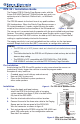
3. If program audio is not muted during a PA broadcast,
turn the Paging Sensitivity adjustment knob on the
front panel of the PVS 405D clockwise.
4. If program audio is muted without a page occurring,
turn the Paging Sensitivity adjustment knob on the
PVS 405D counterclockwise.
5. To prevent the switcher’s audio from being
restored prematurely due to pauses by the
announcer, a time delay may be set from 1 to 8 seconds via SIS commands or
conguration software. Default is 3 seconds. See the PVS 405D User Guide for
SIS commands.
NOTE: To complete the system installation, see the PoleVault Digital System
Installation Guide (featuring the PVS 405D switcher), available online at
www.extron.com.
PVS 405D
POLEVAULT SWITCHER
AUDIO LEVEL ADJUST
PEAK
NORMAL
SIGNAL
VOICELIFT
PAGING
SENSOR
SENSITIVITY
AUDI
O
LEVEL AD
J
PEAK
N
O
RMAL
S
I
G
NAL
VO
I
C
ELIFT
J
Figure 9. Paging Sensitivity
Adjustment Knob
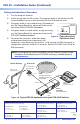
Figure 10. Typical PPS 35 Application Using the PVS 405D Switcher
68-2468-01
Rev A
10 13