
User's Manual


6
Key functions:
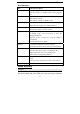
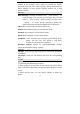
Key Function Description
Call Key Make or answer a call.
Press the Call Key in standby mode to enter All Calls
list.
END key End an active or reject a call.
Hold to Power On/Off.
Exit from any interface to standby mode.
Left soft key Enter main menu in standby mode.
Select the correct option on a different interface
Right soft key Enter all the contact in standby mode.
In the menu interface execution returns
Navigation keys Move the cursor up, down.
In standby mode, used as hot keys to enter the
designated functions.
Press the up key or down key to adjust volume in
conversation.
Used as direction key in games.
OK key Confirm the commands and option selected.
Confirm the character chosen while character inputting.
0~9 Number keys Input numbers or characters.
Press the * Key twice to input + in standby mode.
Make a speed dial call (1~9) in standby mode.
Press to enter corresponding submenu.
# key Hold the #key in standby mode to enable /disable Silent
mode.
Press the # key to change the text mode when edit text.
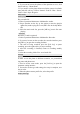
*key Press the * key to enter symbols in text input mode.
Menudirectory
Contacts
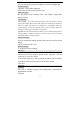
The mobile phone can store up to Contacts. The contacts store in
the mobile phone and in the UIM card. After selecting a telephone