
Application Note
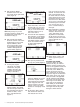
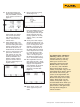

6. At this point depress “As
Found”, select “Instrument”
and press “ENTER,” then fill
in the template as shown in
figure 16.
Figure 16.
Press “DONE.” You should
now see the split screen,
with soft key choices of
“Abort,” “Auto Test” and
“Manual Test.”
7. Select “Manual Test,” and
watch the DPC start at 0 %.
Once the reading has settled,
depress “accept point.” Per-
form the 50 % and 100 %
measurements the same way.
8. Once the 753/754 has com-
pleted this evaluation, it
will display the post test
summary screen with the
SOURCE, MEASURE and
ERROR columns. Failures
appear in reverse video in
the Error column (Figure 17).
Depress “Done.”
Figure 17.
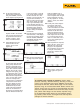
9. Now you see the Tag entry
screen (Figure 18).
Figure 18.
Press the “ENTER” key to edit
the entries. Depress “Done”
when complete until the split
screen reappears with the
soft key options of: “As Left,”
“Adjust,” “Save,” and ”More
Choices.”
10. At this point, select “Adjust”
and the DPC will source 0 %
(4 mA) and measure for 3 PSI
to 2 %. As long as the error
exceeds 2 % the Error win-
dow in the measure half of
the screen will be in reverse
video. Adjust the zero on the
I to P until the error is less
than 2 %. Next select “Go to
100 %” and adjust span in
the same way. Select “Go to
50 %” and evaluate linearity.
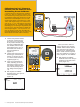
11. After adjustments are com-
plete, select “As Left,” “Done”
and “Manual Test” and repeat
step (8). If the adjustment
was successful, all the errors
in the post run summary
should be in normal video
(Figure 19).
Figure 19.
12. Select “Done,” “Done,” and
“Done” again and you are
done!
Fluke Corporation 750 Series Documenting Process Calibrators 5
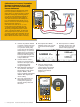
To review your results in
memory, select the “More
Choices” soft key, then the
“Review Memory” soft key.
Move your cursor to the
applicable result and press
ENTER. Select “As Found”
or “As Left,” then “ENTER.
Press “Next Page” for the
results, and press “Tag” for its
associated label. Select “Done”
and “Done” and move your
cursor to the applicable “As
Left” result and press “enter.”
Review the setup for the test,
select “Next Page” for the
results, and press “Tag” for
its associated label. When you
are finished reviewing results,
press “Done” until right-most
soft key label changes to
“More Choices.”