
User's Manual


DPC/TRACK
Users Manual
1-6
Terminology
Certain terminology is used throughout DPC/TRACK to describe different
elements of the program. These common terms are informally defined below:
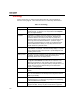
Table 1-2. Terminology
Term Description
Arrayed Field An arrayed field tracks multiple entries (elements) relative to the
specific field type. An example of an arrayed field is the Testpoints
field in the Tag ID database.
Database A database is a collection of records pertaining to some common
theme, such as Test Equipment or Test Results. Databases are
sometimes related to one another so that they may easily share
information between their respective records. Good examples of this
are the Tag ID and Test Results databases. A particular Tag ID
record may be associated with any number of Test Results records.
Since the databases are related, you may easily review the Test
Results records for a particular device.
Display Format The display format for a field defines how data appears when that field
is not selected. For example, a Number field may display a % symbol
until you select that field, at which time the % symbol disappears and
the editing format is used.
Editing Format The editing format for a field defines how data appears when that field
is selected. The editing format is independent of, though not
necessarily different from, the display format.
Field A field is a particular piece of information that is being tracked, such as
the Tag ID or Serial Number associated with an instrument. The
different types of fields are: Text, Number, Date, Pick, and YesNo.
These field types may be of a singular (scalar) or arrayed nature. The
specific rules governing the different field types are discussed in
Chapter 7, “Changing Data.”
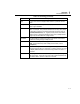
Field Box A field box is the rectangular box (varying in size) in which data is
entered.
Field Definition A field definition determines the type, format, and data limitations for a
field. Your field definitions have already been configured to meet the
needs of your industry.
Field Name The field name is the name of the piece of data recorded in the
associated field box. The field name is typically (but not necessarily)
to the immediate left of the field box.
Form A form displays data. Forms typically contain tabbed pages that
categorize the data, but they may also contain buttons or graphics.