
User's Manual


Overview
The Fundamentals
1
1-7
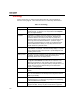
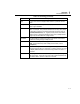
Table 1-2. Terminology (continued)
Term Description
Page A page is the area that displays fields relative to a particular tab on a
form.
Primary Field The primary field is the key field that uniquely identifies each record
within a given database.
Record A record is a collection of fields that are related through the primary
field. For example, for a particular device there are many other pieces
of information (other than the primary field) that are tracked, such as
Due Date, Manufacturer, etc. Together, these pieces of information
define a record. Records are displayed using forms. Multiple tabbed
pages may be associated with a single record.
Record Bar The Record Bar is located at the bottom of the screen and contains
buttons for scrolling through multiple records.
Scalar Field A scalar field can only track a single piece of data, such as the Due
Date. (Arrayed fields may track multiple pieces of data, such as
Testpoints.)
Subform A subform is a region within a tabbed page whose appearance
changes based on data in a certain field. Typically, subforms are used
to display additional fields or buttons that only pertain to the data in a
Pick field.
Tab Each page of information on a form may be accessed by selecting the
tab for that page. A tab may be thought of as a label that identifies the
information within—similar to a label on a file folder.