
User's Manual


DPCTrack2
Users Manual
19-4
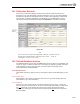
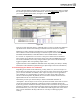
19.2.1.3 Calibration ID
When a new calibration record is saved, the System assigns it a unique number, which
then appears in this field indefinitely.
19.2.1.4 Calibrated & Scheduled Dates
DPCTrack2 automatically inserts today’s date into the Calibrated field, but this date can
be modified by typing a new one into the field. The date in the Scheduled Date would be
the date that the item is actually due for the calibration.
19.2.1.5 Cal Frequency
This field will fill in automatically when the ID is selected. If the item does not have a
frequency set up then this field will be blank. This field can not be modified.
19.2.2 Item Info (As of Calibration Record Entry Date)
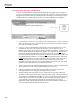
This portion of the page contains information pulled from the ID type entered. This field
is not modifiable and will not change. (Example: If the location changed after the
calibration was completed, this calibration record would always show the Location at the
time the Calibration was performed)
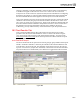
19.2.3 General Calibration Info
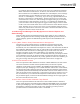
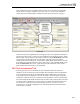
This portion of the page contains general information about the calibration.
19.2.3.1 Temperature & Humidity
These two fields are alpha numeric and you can enter up to 20 characters in each.
19.2.3.2 Calibration Type
This field can be filled in by selecting from the drop down list. For more information see
Chapter 12
19.2.3.3 Certificate #
This is an optional alpha numeric field available to help manage your calibrations. You
can enter up to 20 Characters.
19.2.3.4 Who Calibrated
You may either choose from the drop down list or to add a technician select New. For
more information see Chapter 12
19.2.3.5 Man Hours
This field can manually entered up to 9,999.99
19.2.3.6 Reason for Failure
This field can be set as “Required” Company level have been turned on. If this option is
turned on and a “Failed” calibration is entered, you will not be able to save until a reason
is given. This is an alpha numeric field up to 50 characters.
19.2.3.7 # of Cal Points
This field will list the amount of calibration points, if any, and is not modifiable.
19.2.3.8 Finalized, Finalized By & Date Finalized
This check box is for finalization of a calibration. Depending on your settings, this box
may not be accessible and grayed out. The Finalized By & Date Finalized fields will be
filled in upon saving a Finalized calibration.
19.2.3.9 Automatic Date Rolling Functionality
Keep in mind that when a new calibration record is entered for an Instrument, Loop or
Test Instrument, DPCTrack2 is designed to automatically roll its next scheduled
calibration date forward another frequency cycle upon a passing calibration. When