
User's Manual
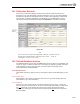


Calibration Screen
19.3 Test Results Tab19
19-5
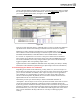
entering a calibration, if the date calibrated is within the period of the current frequency,
a checkbox will appear in the Roll Dates and/or Close These Items On Calibration
Completion box on the Calibration Information tab (for more information on configuring
frequencies see Chapter 12). The text of the checkbox indicates the current due date and
the next scheduled date that will be applied to the item upon a successful calibration.
Once a new calibration record is saved, all events that took place as a result of the entered
calibration will be listed, but grayed out and inaccessible in the Roll Dates and/or Close
These Items On Calibration Completion box. These events include next due date that may
have been rolled forward for calibration and updates to the item’s status. From the time
the calibration is saved, this information will always be available on the record.
Additionally, you may double-click any of the items listed to open the specified record.
19.3 Test Results Tab
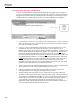
Once you have finished entering data on the Calibration Information tab you may
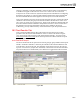
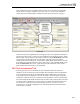
proceed to enter the results of the calibration on the Test Results tab shown in Figure
19.2. All test points will be listed in order and grouped accordingly. You may use the
Next Group
and Previous Group buttons at the top of the tab to move between test point
groups, if applicable.
19.3.1 Test Point Groups
The Point column lists all test points for the current group by group number and test point
number. All found as and left as values may be entered into the columns labeled as such
in the Readings section of the grid. The calibration record shown in Figure 19.2 has the
Separate As Found/As Left Inputs box unchecked, it shows both rows for each individual
test point. If the box was checked then you would have to toggle between the two fields.
F
igure 19.2