
Schneider Electric Integration Guide

Rev 2.2 02-10-22
Fortress Power – Schneider XW Pro Inverter Guide
505 Keystone Rd, Southampton, PA 18966 . (877) 497 6937. sales@fortresspower.com . Fortresspower.com
6
eVault Max 18.5kWh
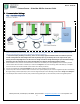
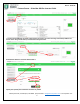
IMAGE 2.5: EXAMPLE OF COMPLETE HARDWARE SETUP BETWEEN 3 EVAULT MAX 18.5KWH AND SCHNEIDER XW PRO.
***Closed loop is compatible for up to 20 batteries connected in parallel. Make sure that each batteries are updated to the
latest firmware version. Important! Before paralleling each battery, make sure the voltage difference between them is less
than 0.5v from one another. Pairing batteries with voltages above 0.5v may damage parts of your battery due to over surge
current. If the battery/ies have voltage differences use the inverter or charge controller to charge the battery/ies up to the
desired voltage.
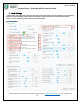
If using only one battery, set the battery ID to 0, Protocol to 5. Turn the terminator switch to 120ohms and place the
communication cable into the RS485 port. Turn the battery off then on and confirm Battery ID 0, Protocol 5.
1. For multiple batteries: turn off or open eVault MAX breaker. Turn on the battery: record voltage, set the battery ID and protocol as described
below. If the battery voltages are not within 0.5V, the battery that is not in the range should be charged or discharged.
2. When paralleling multiple batteries, you need to choose which battery will be the master and which will be the slaves. You do
this by Setting the Master battery ID to 1 and set the rest in chronological order as describes in Image 2.5. If the install is only a
single eVault set battery ID to 0.
3. Set the protocol ID to 5 on all batteries. This identifies the Schneider communication protocol.
4. Turn off all batteries. Take note to identify which battery is Master Battery 1
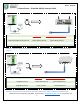
From Battery eFlex5.4kWh eVault Classic & Max 18.5kWh
InsightHome port 9 brown-white (wire 7) green-white (wire 3)
InsightHome port 11 brown, (wire 8) blue-white (wire 5)