
Installation Guide


page 6
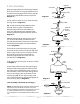
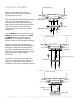
6. Wiring.
WARNING: Turn off circuit breakers to current fixture
from breaker panel and be sure switch is turned to
the OFF position.
CAUTION: Be sure outlet box is properly grounded and
that a ground wire (GREEN or Bare) is present.
Make sure all electrical connections comply with Local
Codes or Ordinances and the National Electrical Code.
If you are unfamiliar with electrical wiring or if the
house/building wires are different colors than those
referred to in the diagram to the right, please use a
qualified electrician.
Note: Excess lead wire length from the fan can be cut to
the desired length and then stripped.
WARNING: If using this fan in a WET location, this fan
must be connected to a supply circuit that is
protected by a Ground Fault Circuit Interrupter
(GFCI) to reduce the risk of personal injury, electrical
shock or death.
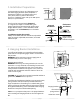
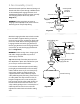
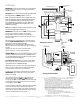
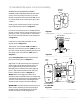
When downrod is secured in place on the hanging
bracket, WIRE THE RECEIVER with wire connectors
provided as shown in diagram at right.
Tip: While you are wiring, keep in mind that wires
must not obstruct receiver from sliding into hanging
bracket.
* Wrap each wire connector separately with
electrical tape as an extra safety measure.
[PLEASE NOTE: Wall and/or handheld remote control
must be used for fan to operate. If you do not wish to
use the wall control, please proceed to Section 7, page 7
to continue with fan installation.]
To install wall control, remove existing wall switch.
Wire one of the wall controls with wire connectors
provided as shown in diagram at right.
*Wrap each wire connector separately with electrical
tape as an extra safety measure. Gently push wires
and taped wire connectors into outlet box.
Install one 12-volt battery (included) in wall control.
IMPORTANT: Wall control will not function unless
battery is installed.
Since this fan comes with with a LED light kit, the
dimmer switch (labeled DIM and ON) has been
pre-set to the "ON" position (DIM). If you do not wish
to have dimming capability, please move the switch
to the "OFF" position (ON).
Select a faceplate (almond or white) and press firmly
onto front of wall control. Attach wall control to
outlet box and secure with screws from original wall
switch. Attach plate (included) to wall control using 2
screws provided with the wall control.
Modifications not approved by the party responsible for compliance could void
the user's authority to operate the equipment.
*NOTE: This equipment has been tested and found to comply with the limits for
a Class B digital device, pursuant to Part 15 of the FCC Rules. These limits are
designed to provide reasonable protection against harmful interference in a
residential installation. This equipment generates, uses and can radiate radio
frequency energy and, if not installed and used in accordance with the
instructions, may cause harmful interference to radio communications.
However, there is no guarantee that interference will not occur in a particular
installation. If this equipment does cause harmful interference to radio or
television reception, which can be determined by turning the equipment off
and on, the user is encouraged to try to correct the interference by one or more
of the following measures:
* Reorient or relocate the receiving antenna.
* Increase the separation between the equipment and receiver.
* Connect the equipment into an outlet on a circuit different from that to
which the receiver is connected.
Consult the dealer or an experienced radio/TV technician for help.
black
11
-
22
-
DIM/ON
OFF
outlet box
wall
control
dimmer
switch
face
plate
plate
12V battery
(wiring for wall control)
black
(AC IN from
breaker box)
black
(TO power SUPPLY)
black (OUT to fan)
green
green/
bare
ground
(wiring for receiver)
ground (green
or bare)
white supply wire
black supply wire
black
black
white
blue
blue
white
from receiver
black
AC IN L
AC IN N
white
white
ground (green
or bare)
from fan
from receiver
antenna
from ceiling
receiver
black
*