
User Manual



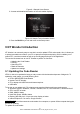
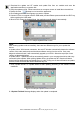

Table Of Contents
- One-Year Limited Warranty
- Safety Information
- 1 Using This Manual
- 2 Introduction
- 3 Getting Started
- 4 OBDII/EOBD Operations
- 5. DTC Lookup
- 6 Review Data
- 7 System Setup
- 8 Tool Information
- 9 NT Wonder Introduction

NT301 OBDII/EOBD Code Reader User’s Guide_English Version_V1.00
42
Figure 7-19 Sample LCD Test Screen
3. To quit the test, press the BACK key.
7.6.2 Keypad Test
Selecting Key Test option opens a screen that allows you to check the functionality of the keypad.
To test the keypad:
1. Use the UP/DOWN key to highlight Keyboard Test from Setup menu and press the ENTER
key.
Figure 7-20 Sample Tool Self- test Screen
2. Press any key to start test. Key name or scroll direction should show on display when you press
a key. Double press BACK to return.
Figure 7-21 Sample Key Test Screen
7.6.3 LED Test
Selecting LED Test option opens a screen that allows you to check the functionality of the LED.
To test the LED: