
User Manual



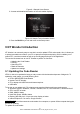

Table Of Contents
- One-Year Limited Warranty
- Safety Information
- 1 Using This Manual
- 2 Introduction
- 3 Getting Started
- 4 OBDII/EOBD Operations
- 5. DTC Lookup
- 6 Review Data
- 7 System Setup
- 8 Tool Information
- 9 NT Wonder Introduction

NT301 OBDII/EOBD Code Reader User’s Guide_English Version_V1.00
43
1. Use the UP/DOWN key to highlight LCD Test from Setup menu and press the ENTER key to
start test.
Figure 7-22 Sample Tool Self-test Screen
2. Scroll with the up and down arrow keys to select the desired LED lamps to check. The LED
should turn on/off according to the selected commands.
Figure 7-23 Sample LED Test Screen
4. To quit the test, press the BACK key.
8 Tool Information
Selecting About option opens a screen that show information about your code reader, such as
serial number and software version.
To view information of your code reader:
1. Use the LEFT/RIGHT key to highlight About from home menu and press the ENTER key.