
Operating Instructions
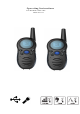

Talk range depends on the terrain. It will be affected by concrete structures, heavy foliage and by operating radios
indoors or in vehicles.
Operating the unit
Turning unit on/off:
1-- Switching on
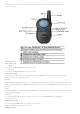
Press and hold the Menu/PWR until you hear a beep sound.
2-- Switching off
Press and hold the Menu/PWR until you hear a beep sound.
Adjusting the Volume:
You have 8 preset volume levels. To raise the volume press the Up / MON button and to decrease the volume, press the
Down /SC button ,press PTT button to confirm.
Key lock:
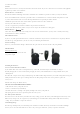
Press & hold Lock/Torch button 4 second ,the unit will be locked and lock icon will be displayed in the LCD screen ,when the units
is locked ,only Lock/Torch button , PWR button, PTT button can be available ,Press & hold Lock/Torch button 3 second,it will be
unlocked.
Torch:
Press Lock/Torch button ,it will be on , Press Lock/Torch button again,it will be off .when the unit is turn off ,the torch still can be
on/off by Lock/Torch button
Auto scan.
Press & hold the Down /SC button for 3 seconds to activate auto scan,Press Menu/PWR button or PTT button
to deactivate auto scan.
Monitor (Zero squelch)
Press & hold the Up / MON button for 2 seconds to activate monitor.
Press Up / MON button again to deactivate monitor.
Changing Channels