
Operating Instructions

You have channels with the legal frequency at your disposal. To communicate with another device,you must both be on the same
channel.To change channels, once you have turned your unit on, press the Menu/PWR once and use the Up/Down button to
scroll through to your desired channel. To set your desired channel, press the PTT button to confirm changes.
Your unit is simplex “one way at a time”. While you are speaking, you can not receive a Transmission.
Your unit is an open--‐license band. Always identify yourself when transmitting on the same channel.
IMPORTANT: Before transmitting on a channel listen to ensure it is not already in use.
CTCSS/DCS
Press the Menu/PWR button twice and use the Up/ Down to introduce CTCSS/DCS Continuous Tone--Coded Squelch System
or CTCSS is a circuit that is used to reduce the annoyance of listening to other users on a shared two--way radio
communications channel. It basically allows a private CH on a busy stream.
CTCSS = Coded tone controlled squelching system. This allows you to talk on a private sub channel on an active channel.
DCS is a digital extension of CTCSS.
DCS=DCS is a digital extension of CTCSS.It provides extra,digitally coded,squelch codes that follow after the 38 CTCSS codes.
CTCSS 1 to 38 ,followed by DCS 39-99.
VOX
voice operated transmitter ,it allows you to transmit with your voice without pressing the button.
Your communicator is equipped with an adjustable Voice Operated Transmitter(VOX) that can be used for automatic voice
transmission.
In this convenient mode,transmission is automatically initiated by speaking into the microphone.There is no need to push the button.
By press Menu/PWR button 3 times,screen will display VOX character,character OF keep flashing,Press Up or Down button to select
voice level(from 1 to 3 level or OF),by press PTT button to confirm setting,VOX default setting as off.
CA
Call allows you to adjust different tones for calling the operator from the same channel.
Press Menu/PWR button 4 times,screen will display CA character,digital 01 keep flashing,by press Up or Down button to select call
tone from01~10,press PTT button to confirm call tone setting,default setting for call tone is 01.
There are 10 mode call tones in this unit,you and other party can use designed call tone to communicate separately,secretly to avoid
any disturb.To activate this feature,With the unit in normal mode, press twice quickly and release the PTT button to send a tone to
other users on the same channel.
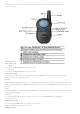
Key tone
Symbol on the display when Key tone is opened.
Press Menu button 5 times,screen will display tO ON(Key tone is opened),press Up /MON button to choose ON or Down/SC button
to choose OF.Default setting is ON,press the PTT button to confirm changes.
Roger Beep
Roger beep means a tone added to the end of broadcast, it indicates that the user/operator has conclude speaking.
This is a tone which is automatically transmitted whenever the PTT button is released.
This alerts the receiving party that you have ended the transmission, and you are now in receive mode.
Press Menu/PWR button 6 times,screen will display ro ON,press Up or Down button to choose ro OF or ON,press the PTT button
to confirm changes.
TOT
time out timer means the unit will automatically stop transmit after 30sec or 60 sec continuously transmit.
Press Menu button 7 times,screen will display tt 60(TOT 60 sec is on),press Up or Down button can choose 60 or 30 seconds or
OF.Default setting is 60 seconds,press the PTT button to confirm changes.
Transmitting (sending speech)
The unit is continuously in the Receive mode when the unit is turned ON and not transmitting.
When a signal is received on the current channel, receive icon will be displayed on the LCD screen.
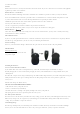
a.Press and hold the PTT (Push to Talk) button to transmit your voice. The transmit signal icon will display on the LCD screen.
b. Hold the unit in a vertical position with the Mic (Microphone) 5cm away from the mouth. While holding the PTT button,
speak into the microphone in a normal tone of voice.
c. Release the PTT button when you have finished transmitting.For others to receive your transmission, they must be on the same