
Operating Instructions

channel as you.
Reset the unit
Take away the battery from walkie talkie battery compartment,then hold the Menu/PWR button meanwhile put back the battery
to walkie talkie battery compartment in right polarity,the unit will turn on and display CH 1 OF ,at this time ,release the Menu/PWR
button.
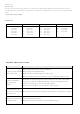
Channel and Frequency (MHz)
USA(22ch)
Ch. Frequency Ch. Frequency Ch. Frequency Ch. Frequency
1 462.5625
2 462.5875
3 462.6125
4 462.6375
5 462.6625
6 462.6875
7 462.7125
8 467.5625
9 467.5875
10 467.6125
11 467.6375
12 467.6625
13 467.6875
14 467.7125
15 462.5500
16 462.5750
17 462.6000
18 462.6250
19 462.6500
20 462.6750
21 462.7000
22 462.7250
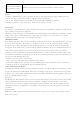
TROUBLE SHOOTING GUIDE
PROBLEM GUIDE
No power or radio switchs
off after short time
1:Check charger and correct battery installation.
2:Clean battery contacts(Important!) .
3:Replace battery by fully charged or a new battery .
4:Battery capacity poor:battery defective or at end of lifetime replace battery.
I cannot communicate
with other group
members
1:Verify,that the channel frequency and the CTCSS are the same in the whole
group.If you use factory default programming ,this is automatically ok if all
members of your group use the same channel number.
2:The other group members are not with the radio coverage.
You can hear the voice
from other users,but they
cannot hear you
1:Please change your setting to exactly the same number as the partners are using .
Others hear my voice with
interruptions only
1:Too weak signal-too far away .
2:External mic defective? Please let service technicial check.